Club Security Simulator 3D
- 3.3
- Rating
- 10.00M
- Installs
- Free
- Price

 Analysis by App-foxy
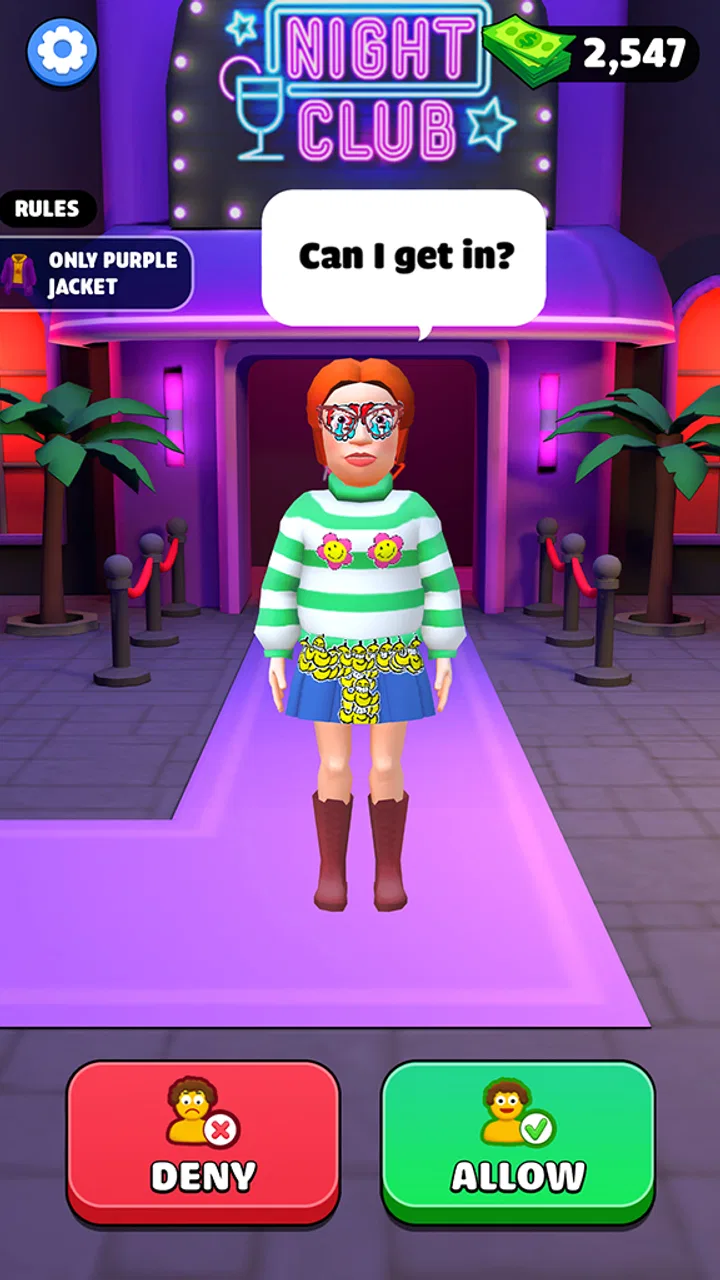
Club Security Simulator 3D puts me in a role that is easy to understand but surprisingly demanding in practice: I work the entrance of a nightclub and decide who can safely enter. It is a free simulation game from Dinosaur House, aimed at Everyone, and its central idea is much more focused than the usual life or management simulator. Instead of building a venue or managing a large business, I spend my time examining guests and making quick decisions about the safety of the club.
That narrow premise is also what makes it interesting from an accessibility point of view. The game asks me to read what is happening on screen, notice visual details, navigate through repeated checks, and respond with reasonable speed. I found that the experience depends less on complex strategy than on how comfortably I can process information and operate the controls. If you enjoy short, task-based sessions and the fantasy of being the person who keeps a chaotic entrance under control, this is worth considering. If you need highly adjustable presentation or a slower, more forgiving pace, the fit is less certain.
How clearly the entrance routine communicates what to do
The first strength is the clarity of the role. I do not have to learn a complicated backstory before playing. The game presents me as a nightclub security guard, and the basic purpose is immediately understandable: inspect guests and protect the people inside. That direct framing helps the game feel approachable, especially for players who prefer a simulation built around one repeated responsibility rather than a large collection of systems.
You May Also Like

 Blood Strike: 2.5 Anniversary
Blood Strike’s Loadouts Turn Every Drop Into a Tactical Gamble
A close look at Blood Strike’s custom loadouts: how fast access to signature weapons reshapes its battle royale rhythm, rewards preparation, and narrows the gap between fights.

 Pandora - Music & Podcasts
Pandora’s Music Is Easy to Start, but Harder to Recover
Pandora’s strength is its low-effort path from a seed to a station. Its weak spot is how much confidence it asks you to place in connection, setup, and quiet recovery.

 8 Ball Pool
 Is Built on Rivalries, Rematches, and Routine
A close look at the rivalries, rematches, shared routines, and unanswered safety questions that turn a quick pool match into a persistent mobile community.

 Samsung Music
’s Quiet Strength Is Playing What You Already Own
Its reach comes less from spectacle than from dependable access to a personal library. That simplicity is both the app’s strongest retention engine and its ceiling.

 AccuWeather: Weather Radar
AccuWeather Review: A Quick, Clear Forecast for Everyday Decisions
For everyday plans, the best forecast is the one you can understand quickly. AccuWeather makes rain timing, radar, and local conditions easy to act on, with a few trade-offs.

 Hill Climb Racing
Why Hill Climb Racing Still Turns Crashes Into One More Run
A tiny car, a bumpy hill and one more upgrade: Hill Climb Racing keeps resurfacing because its simple chaos makes every near-miss feel personal.
More From Our News Desk



In my experience, the most important information is presented through the scene itself. I need to look at the arriving person, identify anything relevant, and decide whether the guest should pass. This makes the game readable in a practical sense, because the objective is connected to what I am already looking at. There is less separation between instructions and action than in a traditional management game where I might spend more time opening menus, reading reports, or comparing numerical dashboards.
That simplicity does not mean every moment is equally easy to follow. Repeated screening can make small visual details more important, and a busy scene may demand more attention than the short store summary suggests. I recommend playing the first sessions without rushing. Learning which parts of the guest presentation deserve attention is more useful than trying to move quickly from the start.
The navigation is best understood as a sequence of decisions rather than free exploration. I am not wandering through a large nightclub or managing every department. I am focused on the security checkpoint and the people who arrive there. That limited scope is helpful for players who become overwhelmed by open-ended games, since the next task generally grows out of the current screening.
At the same time, players who rely on very large text, strong contrast, or extensive interface customization should approach with realistic expectations. I would not choose this game assuming that every visual element can be enlarged or rearranged. Its appeal comes from observing the presented scene, so the quality of the experience depends heavily on how comfortably the player can distinguish those details on the chosen phone or tablet.
Why the visual inspection is more important than the simulation label suggests
Many simulation games let me compensate for weak reflexes by planning ahead, adjusting settings, or waiting for a convenient moment. Club Security Simulator 3D feels more immediate. The core challenge is not simply deciding what kind of manager I want to be; it is noticing the information attached to each guest and acting on it. That creates a useful trade-off: the game is easy to understand, but careful observation matters more than the basic premise might imply.
For readability, I found a larger screen more comfortable than a small phone display. A tablet or a phone held at a comfortable distance gives the scene more room, which can reduce the need to stare at tiny details. This is not a special feature of the game, but it is a practical adjustment that can make the screening routine less tiring. I would also avoid playing in a dark room with the display turned very low, because the experience already depends on visual attention.
Another useful habit is to pause mentally between guests, even when the game encourages a steady flow. I try to finish one decision before immediately looking for the next one. That reduces mistakes caused by carrying the previous guest’s details into the next inspection. It is a small workflow change, but it makes the game feel more controlled and helps players who process information more carefully.
Motor, sensory, and situational demands during play
The motor requirements are more approachable than those of an action game. I am not dealing with platforming, aiming, or complex combinations of buttons. The main physical demand comes from repeated touch interaction and the need to select the appropriate response at the right moment. That makes the game potentially suitable for players who prefer a straightforward touch-based routine, although repeated taps can still become tiring for anyone with limited hand endurance or difficulty with precise gestures.
Because the game is built around a security checkpoint, timing can affect comfort. A player who needs extra time to inspect a scene may feel pressure even if the controls themselves are simple. I found that the challenge is not only whether I can touch the correct control, but whether I can do so after gathering enough information. This distinction matters: a simple interface does not automatically create a low-pressure experience.
For players with sensory sensitivities, the nightclub setting deserves attention. The theme naturally suggests a visually busy environment, and the three-dimensional presentation can make the screen more active than a flat checklist or spreadsheet-style simulator. I would recommend trying a short session first and adjusting the device’s brightness or sound to a comfortable level. Those device-level changes may be more useful than expecting the game to provide a complete set of sensory controls.
Audio is not the only consideration. Visual clutter, movement, and the need to shift attention between a guest and the surrounding checkpoint can all influence comfort. Someone who is sensitive to motion may prefer holding the device steady and avoiding rapid changes in viewing position. Someone who processes visual information slowly may benefit from treating each arrival as a separate inspection instead of trying to anticipate several decisions at once.
This is also where the game differs from calmer simulation alternatives. A conventional building simulator might let me spend several minutes arranging rooms or balancing resources. A life simulator may offer many activities but allow me to choose my own pace. Here, the role is narrower and the attention is more concentrated. That can be satisfying for a player who wants a clear job, but it can be frustrating for someone who needs generous time limits or a relaxed planning loop.
Practical ways to make the screening loop easier
I found three habits especially useful. First, I keep the device in a stable position rather than playing while walking or commuting. The game asks for visual checking, so movement around me can make a simple decision unnecessarily difficult. Second, I use a screen size that lets me inspect the guest without leaning close. Third, I lower my speed before I try to improve it. Accuracy is a better starting point than rushing through the entrance.
These habits also reveal an important trade-off. The game can work well in a short break when I want a focused task, but it is not ideal when I am distracted by conversation, travel, or a noisy environment. A player who needs to divide attention between the game and another activity may miss the details that make each decision meaningful. In that situation, a turn-based puzzle or a slower management game would probably be a better choice.
Players with motor limitations may want to test whether the touch targets feel comfortable during the opening session. I would not assume that a role built around checking guests automatically means every action is effortless. Repetition, precision, and timing can combine to create fatigue even when there are only a few basic interactions. Playing in shorter bursts is the sensible approach if the hand or wrist begins to feel strained.
The game is also more suitable for some cognitive styles than others. I enjoy it when I can focus on a rule, inspect the current case, and commit to a decision. Players who prefer exploring multiple solutions or building a long-term strategy may find the loop too narrow. The satisfaction comes from improving attention and consistency, not from discovering a large world or designing an elaborate club.
Who can use the game comfortably in everyday situations
A realistic use case is a short session at home after work. I can sit with the phone at a comfortable distance, play through a few guest checks, and stop before the repeated inspections become tiring. The game’s free price makes that kind of low-commitment trial easy, particularly for someone who wants to sample a simulation without paying first. Its Everyone content rating also makes the theme broadly approachable, although parents should still decide whether the nightclub setting suits the individual child.
I can also imagine it working for a player who enjoys discussing decisions with a friend. One person can watch the screening and question whether a guest should be admitted, while the other operates the game. That turns a solitary task into a small conversation about observation and judgment. It is not a substitute for a dedicated multiplayer experience, but the clear role makes the game easy to explain to someone who has never played it.
For users with attention differences, the focused checkpoint may be a benefit. There is one central responsibility, and I do not need to remember a large inventory, a sprawling map, or many unrelated objectives. However, the same repetition may become monotonous for players who need frequent changes of activity. I would treat it as a concentrated visual task rather than a game that constantly supplies new forms of stimulation.
For younger players, the Everyone rating is reassuring in terms of the listed content category, but the security theme still involves judging who belongs in a nightclub. I would explain the premise in simple terms and, if necessary, play alongside them at first. The game is easier to understand when the player knows that the goal is responsible checking rather than blindly allowing everyone through.
For older players or anyone less comfortable with three-dimensional mobile games, the direct premise helps. There is no need to memorize a complicated control scheme before understanding the objective. Still, the visual inspection can be demanding if text or guest details appear small on the device. A larger display and a quiet room may make a bigger difference than gaming experience.
How it compares with other simulation choices
Compared with a city builder, this game offers far less long-term planning. I am not placing roads, balancing a budget, or watching a settlement evolve. Compared with a restaurant or shop simulator, I have fewer business decisions and a much stronger emphasis on screening individual visitors. Compared with an action game, the pressure comes from observation and judgment rather than combat or fast movement.
That comparison helps identify the right audience. I would recommend this to someone who wants a compact role-playing simulation with an obvious duty and a visual decision loop. I would steer a player toward a management simulator instead if they want customization, resource planning, or a sense of building something over many sessions. I would choose a slower puzzle game for someone who needs time to examine every detail without the feeling of a queue waiting at the entrance.
The game’s strongest accessibility advantage is conceptual simplicity. I know what my job is, and the scene gives that job context. Its main weakness is that the same visual focus can create barriers for people who need larger presentation, reduced motion, slower timing, or more control over sensory intensity. That does not make the game unusable, but it means the device, environment, and personal processing style matter more than they would in a menu-driven simulator.
What remains difficult and how I judge the overall experience
The biggest remaining barrier is the possibility that important information is easy to miss when the screen is small or the player is tired. Since the game’s identity depends on checking guests, visual fatigue directly affects the quality of play. I would not recommend a long session to someone who already experiences discomfort from close-up screens. Short rounds with regular breaks make more sense.
Another limitation is the narrowness of the role. The game does not appeal to me when I want a broad simulation with many ways to express creativity. The checkpoint is the point, not merely the introduction to a larger club-management system. That focus is valuable for accessibility because it reduces complexity, but it also limits variety. Players who need constant novelty may lose interest sooner than players who enjoy refining one repeated skill.
The version available is 1.0.39.1, and it runs on Android 7.0 or later. Those requirements make it approachable for people who do not use a brand-new device, but the practical experience can still vary with screen size and performance. I would check that the phone has enough comfortable display space before deciding whether this is the right game for a particular player. The minimum operating system alone does not tell me how easy the visual checks will feel.
Dinosaur House has chosen a premise that is immediately legible, and the game has attracted more than ten million installs. Its average rating is 3.3 from around 1.4 thousand ratings, which matches my balanced impression: the idea is accessible and easy to try, but the focused loop and visual demands will not suit everyone. I would read that rating as a reason to approach with specific expectations rather than as a simple recommendation or warning.
The free price lowers the risk of testing it for yourself. I would begin on the device I normally use, play in a quiet setting, and pay attention to three things: whether the guest details are comfortable to read, whether the touch actions cause strain, and whether the decision pace feels engaging or stressful. Those checks answer more than a generic description can, because accessibility here depends on the interaction between the player and the screening routine.
My inclusive verdict is that Club Security Simulator 3D is a focused, approachable simulation for players who enjoy visual checking and clear responsibilities, but it is not automatically comfortable for every ability or context. I like the direct premise and the fact that I can understand the task quickly. I would recommend it to a friend who wants a free, short-session game with a distinctive security-guard role and who is comfortable examining a busy mobile scene.
I would suggest another simulation for anyone looking for slower pacing, extensive interface adjustments, deep management, or less visually concentrated play. For everyone else, the best way to approach this game is deliberately: use a stable device position, choose a readable screen, take each guest one at a time, and stop when visual or hand fatigue appears. With those expectations, the game’s narrow design becomes a strength rather than a surprise.
FAQs for Club Security Simulator 3D
01What is Club Security Simulator 3D about?
Club Security Simulator 3D is an engaging simulation game where players take on the role of a club bouncer. Your tasks include managing club entry, ensuring safety, and dealing with various scenarios that a security officer might face. The game blends strategy and quick decision-making, immersing players in a realistic club environment.
02What are the main features of Club Security Simulator 3D?
The game offers several exciting features, including realistic 3D graphics, diverse character interactions, and multiple levels with increasing difficulty. Players can customize their bouncer's appearance, upgrade skills, and unlock new club settings. The gameplay emphasizes strategic planning, quick reflexes, and effective crowd management.
03Is Club Security Simulator 3D available on both Android and iOS?
Yes, Club Security Simulator 3D is available for download on both Android and iOS platforms. You can find it on the Google Play Store for Android devices and the Apple App Store for iOS devices. The game is designed to be compatible with most modern smartphones and tablets.
04Are there in-app purchases or ads in Club Security Simulator 3D?
Club Security Simulator 3D includes both in-app purchases and advertisements. Players can choose to purchase additional in-game currency and items to enhance their experience. While ads are present, they can be removed through a one-time purchase, providing an ad-free gaming experience for those who prefer it.
05What age group is Club Security Simulator 3D suitable for?
The game is suitable for players aged 12 and above, due to its realistic depiction of club scenarios and mild suggestive themes. Parental guidance is advised for younger players. The game focuses on strategic thinking and decision-making, making it appealing to both teenagers and adults who enjoy simulation games.
Pros
- Realistic security scenarios increase engagement.
- Intuitive controls enhance the gaming experience.
- Diverse levels keep gameplay fresh and challenging.
- High-quality graphics add to the immersive feel.
- Multiplayer mode offers competitive fun.
Cons
- In-app purchases can be quite expensive.
- Occasional bugs affect game performance.
- Requires a stable internet connection.
- Limited character customization options.
- Ads can be intrusive during gameplay.

Club Security Simulator 3D
Gallery